How Do You Know When An Automation Is Working?
 Ian Edwards
Ian is a senior engineer and the founder of Tessellium. Combining over a decade of technical experience with his background as a business owner, he specializes in untangling complex operational bottlenecks and getting stalled software projects over the finish line.
There’s a thought that goes through everyone’s mind the first time they let a computer execute a task: “how do I know if it worked?”.
When you do a job yourself, it may be tedious, it may be frustrating, but at least you know it’s done. We all use technology, and we all know that it can fail. And nothing can hurt a small business’s momentum like thinking a job has been done that hasn’t.
Defining What Success Looks Like
There are more things that can go wrong with an automation than can go right. Maybe it gets some unexpected data, maybe the auth has timed out, maybe it didn’t run at all.
So it’s better to define what success looks like. When we set up our automated invoicing, we had three criteria:
- We see a message in the logs between 0930 and 0940 every day
- That message reports a success
- We see new invoices created in Xero within the last week.
This covers the three key bases:
- The automation ran
- The automation reported success
- We see evidence of the desired outcome
Why You Can’t Just Check the Output
So why not just check the number of created invoices matches the expected? It’s a good question. If we check Xero and see exactly the number of invoices we expect to see, then that implies that the automation ran and that we don’t need to check it. But… to work out which invoices we expect to see, we have to go into our database and generate all the invoices for that day. And that could fail for the same reasons the main automation fails. So then the question becomes “how do you know when an automation verifier is working?”, and then you have to make an automation verifier verifer!
So instead of looking for something precise, we’re looking for 3 signals that, when taken together, give us high confidence that the automation was successful.
Making it visible
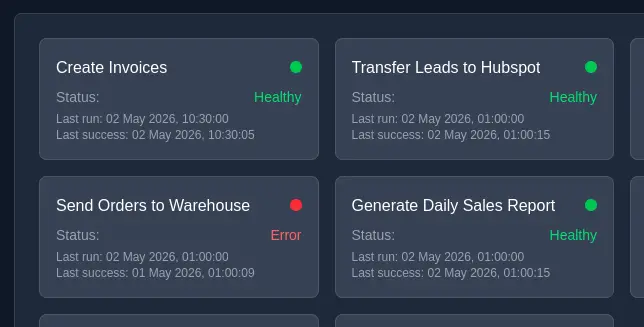
Obviously, having a way to verify success isn’t useful without some way to know about it — and the same monitoring can also tell you when it’s time to retire an automation. From here, it depends on where you want to go. You could connect a tool like Google Looker or PowerBI to the log file and show each automation as green if it was successful, and red if it wasn’t. You could build a dashboard, or email yourself a daily report.
We built a custom dashboard for all of our automations and our customers’ automations. We have the dashboard up on a screen, with a simple green light. If one of them fails, we’re on it immediately. If that kind of peace-of-mind sounds good, then talk to us about how we can manage your automations for you.